
I Built a Gaussian Splatting Viewer That Runs in Any Browser
12 million splats. Any browser. Even a €200 Android phone.
A few months ago, I tried to show a 3D scan of a building to a client. I sent them a link. They opened it on their phone. Nothing worked. Black screen. “Do I need to install something?” they asked.
That moment cost me a deal. And it sent me down a rabbit hole.
The problem nobody talks about
Gaussian Splatting is one of the most exciting things happening in 3D right now. You take a bunch of photos, feed them through some software, and out comes a photorealistic 3D scene that you can walk through, zoom into, and explore from any angle. It’s genuinely magical.
The catch? Actually viewing those results is a mess.
Most viewers need a powerful desktop GPU. Some need a specific browser. Some need plugins that nobody has. Some work on iPhone but break on Android. Some look gorgeous on a €3,000 machine but turn into a slideshow on anything normal.
I wanted to fix that. Not for power users with gaming rigs. For everyone.
What I built
Mirador3D is a viewer that runs entirely in your browser. No plugins. No downloads. No “please open in Chrome.” You click a link, and a photorealistic 3D scene loads in front of you. You can rotate, zoom, walk around — all with your finger or mouse.
It works on desktop. It works on mobile. It works on a €200 Android phone that your aunt might own.
The trick isn’t any single magic technology. It’s a combination of decisions that most people overlook:
Streaming instead of downloading. Traditional viewers download the entire 3D file before showing you anything. That can be 500MB or more. Mirador3D streams the important bits first — you see a rough version immediately, and it sharpens as more data arrives. Like how a JPEG loads line by line, but in three dimensions.
Adapting to your device. The viewer detects what your phone or computer can handle and adjusts automatically. On a powerful desktop, you get full quality. On a budget phone, it dials things back just enough that you don’t notice — but the experience stays smooth. No settings to tweak. No “low quality mode” button. It just works.
Choosing the right format. This is the boring technical part that matters enormously. The format you store your 3D data in determines whether it loads in 2 seconds or 2 minutes. I spent weeks getting this wrong before finding the right approach.
What 12 million splats actually means
Let me put that number in perspective. A typical 3D scan of a room might have 5 to 10 million splats. A full building scan could be 50 million or more. A detailed outdoor scene with vegetation and complex geometry can easily hit 100 million.
Here’s how Mirador3D handles those numbers:
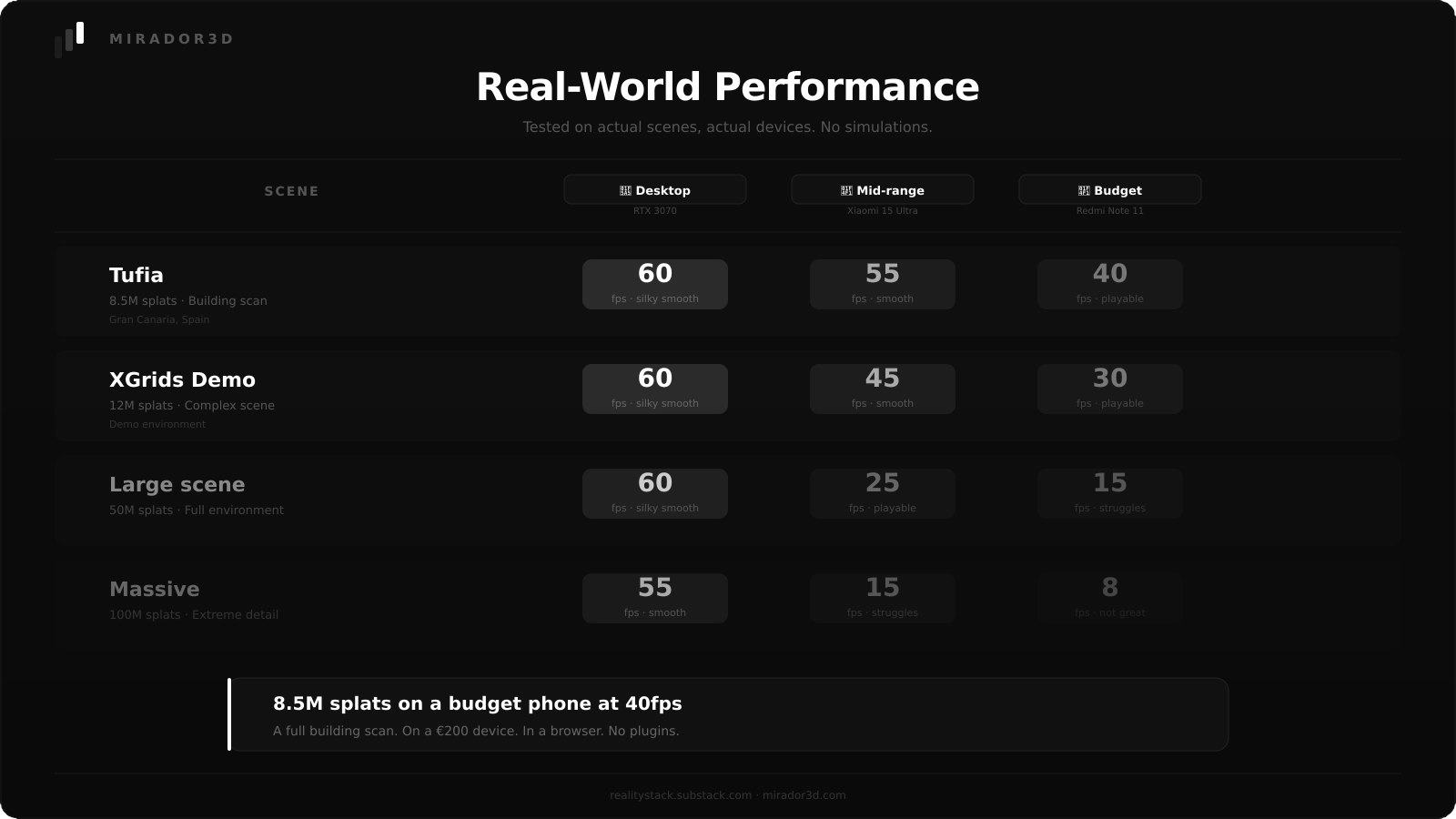
The sweet spot is that middle row: 12 million splats on a budget phone, running smooth. That’s a full building scan, a detailed restaurant, or a complex object — all running on hardware that costs less than €200.
What I got wrong (so you don’t have to)
I optimized too early. I spent weeks building custom compression before realizing that the tool I was already using solved 80% of the problem. Lesson: build first, optimize later.
I ignored the data problem. The viewer is only as good as the files you feed it. Early users were uploading massive raw files and wondering why nothing loaded. I had to build the conversion step into the workflow so they didn’t have to think about it.
I assumed all phones are equal. They’re not. What flies on a flagship iPhone can completely break on a €150 Android. The adaptive quality system exists because of this mistake.
Why this matters
If you work in real estate, architecture, tourism, construction, or any field where showing a space matters — Gaussian Splatting is a game changer. But only if people can actually *see* it. Not on a gaming PC. On their phone. In a meeting. On a bus.
That’s what Mirador3D solves..
Try it
I’ve set up a live demo you can explore right now. Rotate, zoom, walk around. No plugins, no downloads, no account needed.
If you’re curious about embedding 3D scenes in your own website, Mirador3D offers that too.
What’s coming next
Next week, I’ll share the three biggest mistakes people make when trying to get Gaussian Splatting to run on mobile — and what actually works instead. Real tests, real numbers, no fluff.
Subscribe so you don’t miss it.